The FABULOUS Miss Ginger Grant!

The FABULOUS Miss Ginger Grant!
Click here to dig through my stuff!

Miss Ginger's FABULOUS Things!

NEW!!! Visit my online store for your chance to buy all things Ginger!

Search Miss Ginger's FABULOUS World!

Custom Search

Translate

Showing posts with label Machine embroidery. Show all posts

Tuesday, May 7, 2013

Consumer Product Review- Janome 300E Embroidery Machine, pt. II.

After a year of using the Janome 300E Embroidery machine, Miss Ginger is ready to give you her Consumer Product Review® on this miracle machine! She will share what she knows, what she doesn't know, and what she is still trying to figure out- so pour yourself a glass of wine, honey, 'cause she has a lot coming at you!

First, let her say that the Janome machine is not unique- there are many embroidery machines on the market, and at least 2 are simply repackaged versions of the Janome.  While Elna and Bernina both make exquisite sewing machines in Switzerland, they leave the manufacture of their embroidery-only machines to the electronic geniuses in Japan. The Elna 8300 and the Bernette 340 Deco are essentially the same machine as the Janome, and are built in the same factory; the differences are cosmetic and electronic, but the mechanics are all pretty much the same. They all connect the hoop to a post at the back of the machine, which can be seen in the Bernette image below.
Janome
Bernette/Bernina
Elna

The other set of brandmates you will find are manufactured by Brother, and include their nameplate, plus Necchi and BabyLock. They can be recognized by the bar that runs from the front to the back of the machine.
BabyLock
Necchi

The top-of-the-line embroidery/sewing combo machines are typically made in any given brand's factories, but these embroidery-only machines are all manufactured in Japan.  Other than cosmetic differences, the various brands will be programmed to use their brand-specific file type, and may have a proprietary hooping configuration, as well.

So, back to the Janome!  One of the first variables one wants to consider when choosing an embroidery machine is the embroidery size.  The Janome 300E offers a 5.5" by 7.9" embroidery field. While this is not the largest embroidery field available, it is pretty large for a machine at this price.  Please note the "hoop size" and "embroidery size" is not the same.  You can buy a "mega-hoop" for this machine, and many others, but the embroidery capacity of the machine does not change.  "Mega" hoops allow you to combine designs, or pieces of designs, without re-hooping, so a larger design can be created with perfect alignment. 

The Janome comes with 100 designs built in to the machine, a menagerie of floral baskets, teddy bears, and other inane designs.  Built-in designs should really be your last consideration when choosing a machine, because you can download millions of designs from the internet, at a cost of anywhere from free to about 20 bucks. Most designs Miss Ginger has downloaded have cost about $6-7. 

The machine is designed to take PC cards, and Janome offers a number of pre-programmed cards for purchase. 
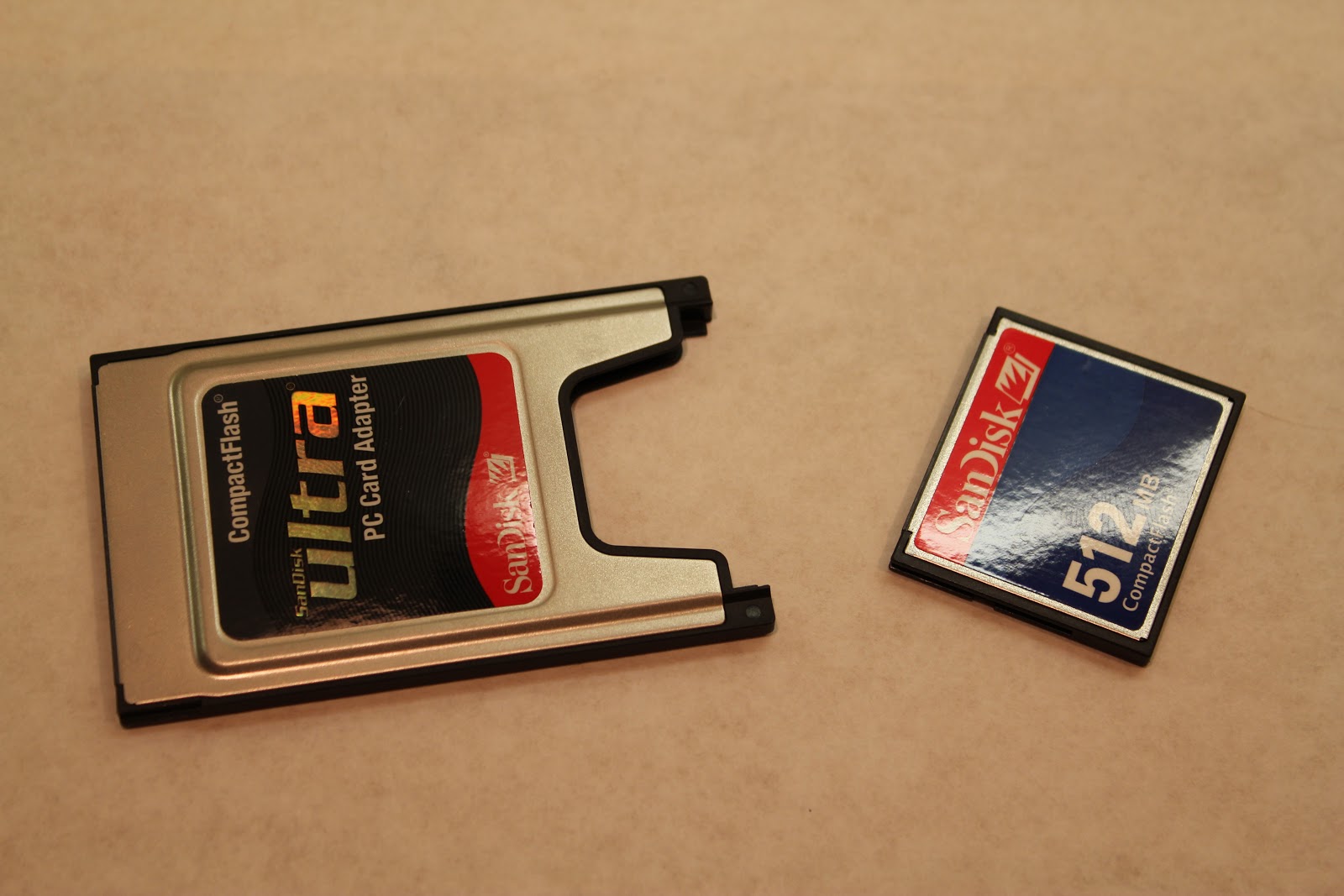
Since PC cards have pretty much gone the way of the floppy disc, they also offer a PC card adapter, that allows you to use a Compact Flash card to carry  designs downloaded from the internet from your PC to your machine.  Compact Flash memory is cheap, so you can maintain your files on CF memory and load them into the machine when you need them.  The machine also has a built-in memory, so your most often used designed can be stored directly on the machine to be called up whenever you need them.  BTW, PC card adapters are commonplace; you don't need one specific to this machine. PC card adapters are available anywhere office supplies are sold.

This machine has 3 on-board fonts that can be used to create 2 and 3 letter monograms without a computer, but with your PC card and the appropriate software, you can create monograms from any TrueType font installed on your PC.

Embroidery thread for these machines is made by several different companies, and each one has it's own numbering scheme to define the colors.  The Janome machine allows you to select among the most common thread brands, and will prompt you with the brand-specific thread number when it's time to change the thread.


There are a number of convenient features built into the Janome that allow it to do some image manipulation without a computer.  It can flip designs horizontally and vertically, as well as rotate them 360 degrees, in 45 degree increments.  Designs can be resized from 90 percent to 120 percent right on the screen, and you can move designs on the screen to change their relative position within the hoop. 

The hoops come with drop-in templates to help you place your design on the fabric, and once the machine is set up, you can have it trace the design area within the hoop to ensure your design fits within the bounds of your project.

One worthwhile accessory that is only available for the Janome, as best as Miss G can tell, the the Janome Clothsetter.  This simple, yet unique device, allows you to ensure your embroidery design with appear exactly where you want it on the fabric.  


The Janome hoop connects to the Clothsetter the same way it connects to the machine. 


With the bottom of the hoop attached to the Clothsetter, the stabilizer and fabric are set on top, the top of the hoop is laid in place, and the arm of the Clothsetter is lowered.  Align the crosshairs on the Clothsetter with the centerpoint on your fabric, press the top of the hoop into place, and you are guaranteed perfect alignment.  This accessory alone would lead me to choose a Janome machine above all others!


The stitch quality of the Janome machine is exquisite... it creates a beautiful satin stitch, a consistent running stitch, and perfect pattern replication, time after time. 
The control panel shows the time left to stitch out, the color progression, hoop size, and machine condition.  In the rare case of a thread break, or the more common occurrence of bobbin depletion, the machine allows you to back up the design in 10 stitch increments, to restitch an pattern areas that were not completely stitched.


Miss Ginger has completed quite a few projects using the machine, the most recent of which was to create "coordinated" sheets to accompany a duvet she bought on clearance, with no matching sheets available!  


The Janome 300E gets Miss Ginger's coveted 5 lipsticks!!

For the money, this machine is a knockout!!


Consumer Product Review: Janome 300E Embroidery Machine Pt. I

It's almost here: Miss Ginger's Consumer Product Review on the Janome 300E embroidery machine she bought last summer.  She's worked with it for about a year now, so she's ready to share what she knows about this machine, and embroidery machines in general.

If you're thinking "I don't sew" but the idea of embroidering garments and linens intrigues you, you're in luck.  You really don't have to know how to "sew" in the sense of cutting patterns, constructing garments, inserting zippers, etc, to embroider beautiful things for yourself or as gifts.  Think of it more like a "printer" that uses thread instead of ink, because that's really a better description!

So many people tell Miss Ginger: "I have a sewing machine... I should really use it more" or "I want to buy a machine and learn to sew", and Miss Ginger tells them "what are you waiting for?!" And Miss Ginger shudders when someone tells her "I have a machine... I think it embroiders...."   Quelle dommage! You already have one of these miracle machines in your house and you're not using it?! Tsk, tsk.

Let's start by talking about machine embroidery in general, and then I will give you details of my experience with my specific Janome machine in a subsequent post.  Embroidery machines use a computer program, generally called a design file, to move the needle and manipulate the fabric to create a pattern of stitches.  Commercial machines use multiple threads and are complicated, noisy, and expensive.  Embroidery machines designed for home use typically sew one color at a time, and the user changes the thread color when prompted by the machine.  You can buy machines that sew and embroider, which might be a great choice if you don't already have a sewing machine, or you can buy a machine like my Janome, that only embroiders; to sew seams and construct garments you need a separate machine.  Because embroidery machines do much of their work untouched by human hands, you can actually construct a garment on your sewing machine while your embroidery machine embellishes other pieces, so having both can be a time saver if you sew a lot.  A few machines are actually convertible, meaning that you can purchase an embroidery module to add to your machine.

The basic functionality is the same across all embroidery and sewing machines. They both have a needle, thread, and bobbin to create the stitches.  An embroidery machine eliminates the feed dog that pull the fabric through a regular machine, and replaces it with an embroidery module that holds the fabric in a hoop and can move it in a vertical and horizontal axis.  The design file controls the motion of the needle and fabric, placing each stitch in perfect alignment to create the pattern.

The design files are what make these machines come to life.  Most machines have some number of designs built-in to the machine, which can be selected right from the controls.  The true versatility, however, comes from the ability to use files from other sources. These machines are computers, and like computers, their technology moves fast. Originally, embroidery machines used floppy discs, CD ROM's, or PC cards that were purchased for specific machines, and preloaded with specific collections of designs. You owned a library of discs that contained your files.  Nowadays, we can download files from the internet to our home PC, and use a USB drive or memory card to transfer the design to the machine.  The most modern machines can now read files directly from your laptop, eliminating the file transfer step. Miss Ginger assumes that the next wave of technology will be Wifi enabled machines that bypass the computer and download files directly from the internet! 

Each brand of machine uses a proprietary file type, which means the same design files are not compatible across multiple brands of machines; if you bought a PC Card or CD ROM of files for a Janome machine, they would not work on, say, a Brother machine.  At one point there may have been competition among brands as to who had the most extensive assortment of designs, or the highest quality designs, but now we download designs directly from the internet, and can choose the file type required for our machine. There is also software available to convert files from one format to another. 


Speaking of software, let's talk about that for a minute, because that subject can be pretty overwhelming. Each brand of machine offers a variety of software packages, and the price tag for all of them can add up really fast! While the software packages sold by Janome, Bernina, Brother, and other machine makers may offer features that work across all formats, they a really designed to be machine specific. There are also software packages available that are not tied to a specific manufacturer, and these often offer more versatility and better value. Both proprietary and non-proprietary software packages are usually sold in "modules" or "plug-ins", so you can buy only the features you will use, and those features will interact seamlessly.

So, what software do you need? Depending on the features of your machine, and your desire for customization, you may not need any software at all. If all you plan to do is download designs off of the internet and use them "as is", you don't need any software.  Most people, however, will want at least some of the features these packages offer.

A basic "File Manager" program will let you organize and open files, rename them, group them, etc.  The file manager program will generally allow you to print templates of the final design that will aid you in placing your work correctly on the fabric. It also allows you to print thread lists (handy when you're heading out to buy thread). File manager programs may allow some design modifications, such as flipping or rotating the entire image, but to actually "open up the hood" and change anything within the design, you will need "Editing" software.  The file manager will call up the editing plug-in, if you've installed it, any time you want to take out a part of the design, resize it, combine or split designs, etc. Some programs combine the file manager and editing modules as on package so you don't have to buy them separately. "Monogramming" software makes simple work of creating custom monograms in any size within the constraints of your machine, using TrueType fonts loaded on your computer, as well as fonts included in the package.  Some machines do basic monograms in limited sizes through on-board controls, but monogramming software gives you total versatility.  

If you REALLY want to get into embroidery, you may want "digitizing" software to convert drawings, clip art, etc. into embroidery files.  The advertisements make it seems easy; the instruction books reveal that it's not.  Digitizing software has a lot of features and "moving parts", so even a computer whiz will need to set aside the time to work through some tutorials if they seriously want to learn to digitize.  "Ain't got time fo' dat?"  There are services online that will take a file you supply, digitize it, and send it back to you, for a fee, of course.  Given the price of the software, and the time it takes to learn it, this may be your best option unless you really intend to get into it!


If you want to turn cheap towels from the wholesale club into great gifts for any holiday,

finish a quilt fast and easy, with computer precision,

monograms everything you touch, to give as gifts or label as your own,

or create one of a kind garments, gifts, decorative accessories, and more, an embroidery machine will help you accomplish it in record time with professional looking results.

Stay tuned for my next post, which will include tips, tricks, and a lot more detail about the Janome 300E!


LinkWithin

Related Posts with Thumbnails